If you spend time around modern outbound teams, you have probably heard people talk about Clay. It is popular for a good reason: Clay gives technical teams a flexible way to build custom lead workflows, enrich records, research accounts, and prepare better outreach.
On demo calls, I get a version of the same question all the time: 'Should I use Fullpilot, or should I just build this in Clay?' The honest answer is that Clay can absolutely be part of the system. Fullpilot exists for teams that want the local business data, owner contacts, and outreach execution already built.
A better way to frame it: Clay helps you build the workflow. Fullpilot helps you find local businesses, reach owners, and book meetings. If you have a technical operator building custom systems, Clay may be exactly what you need. If you want a simpler path from local lead search to meetings, Fullpilot is built for that job.
It is a great question, but it is usually the wrong question.
Asking if you should use Fullpilot or Clay is like asking whether you need the data source or the workflow builder. They are not trying to do the exact same job. They are different parts of a modern revenue stack.
If you sell into the local economy, including SMBs, storefronts, clinics, contractors, studios, and regional operators, treating Fullpilot and Clay as pure competitors can be a strategic mistake.
The most effective local outbound engines do not always choose between Fullpilot and Clay. Many teams should combine them.
So this is not a takedown of Clay. It is a practical guide to when you should use Clay, when you should use Fullpilot, and when the best answer is using both together.
Where local data needs extra care in Clay workflows
Clay lets you connect sources like Google Maps, scraping tools, enrichment providers, and AI research steps. That flexibility is the point. The risk is that a generic local source often gives you the business record before it gives you the buyer. You may end up with a storefront, a website, and a shared info@ inbox, then still need to identify the owner or operator.
Fullpilot is designed to handle that local data problem before the record reaches your workflow. We cross-reference map data, business profiles, public records, citations, and web signals so the campaign starts closer to the person who can actually say yes.
Is Clay a local business database?
Clay is not primarily a local business database. It is a flexible workspace for building lead workflows. Teams use it to connect data sources, enrich records, run AI research, score accounts, and prepare outbound.
That distinction matters. Clay is powerful because it can coordinate a workflow across many tools. Fullpilot is powerful because it provides specialized local business data, owner contact enrichment, and AI SDR execution built for local markets.
Clay vs Fullpilot at a Glance
| Category | Clay | Fullpilot |
|---|---|---|
| Primary role | Custom lead workflow builder | Local business data platform and AI SDR system |
| Best fit | Technical teams building custom enrichment and personalization flows | Teams selling to local businesses that need leads, owner contacts, and meetings |
| Data model | Connects external sources and enriches records | Indexes local businesses, categories, markets, ratings, reviews, website status, and owner contacts |
| Execution | Prepares data and personalization for outbound tools | Can run AI SDR campaigns, follow up, handle replies, and move prospects toward meetings |
| Best combined use | Use Clay for custom workflow control | Use Fullpilot as the local data and meeting engine inside or alongside Clay |
Does Fullpilot replace my sending tool (Smartlead/Instantly)?
This is a common point of confusion. Clay is usually the orchestration layer, not the full sending operation. Many Clay workflows still rely on a sending tool, secondary domains, DNS setup, warmup, inbox monitoring, and reply handling. Fullpilot can replace that separate execution stack when you want the local data and outreach operation managed in one place.
The core misunderstanding: builder vs local engine
To understand why Fullpilot and Clay can work together, we need to clear up a common misconception about what Clay is.
What Clay is
Clay is a flexible builder for lead workflows. It is where a technical team can connect sources, add enrichment steps, run AI research, score records, and prepare outbound data.
Clay does not magically solve every data problem by itself. It is strongest when the team already knows which data sources to trust and how to check the quality of the results.
You can tell Clay to check one provider for an email, try another provider if the first fails, ask an AI model to summarize the company, verify a field, and then push the final record into another system.
Clay is the builder. But you still need the right source data.
What Fullpilot is
The Fullpilot Local Database is the specialized data product inside Fullpilot's broader outbound service.
We built Fullpilot because the data required to sell to local businesses is different from the data used to sell to enterprise software companies. We map the physical and digital footprint of the local economy.
- Storefronts, clinics, studios, contractors, and franchises
- Local categories and geographic markets
- Ratings, reviews, website status, and profile quality
- Owner, operator, and location-level decision-maker contact data
- AI SDR execution for turning enriched local leads into meetings
If you sell to local businesses, Clay can be an incredible builder. Fullpilot is the specialized local source and meeting engine you can feed into that system.
The local data problem inside Clay
Imagine you run an agency that sells reputation management software to med spas. If you build the workflow in Clay but rely on broad databases, the workflow may be elegant while the records are still weak. The reader problem is not Clay itself. The problem is starting from sources that miss local operators, local reputation signals, and owner-level contact paths.
Broad categories also make it hard to isolate specific niches. Standard B2B databases tend to emphasize company size, job titles, and industries. Local outreach often depends on reviews, rating, website status, location count, category fit, and whether you can reach the owner. Fullpilot gives Clay cleaner local inputs so the workflow has better material to work with.
The practical point
Clay helps you build the workflow. Fullpilot helps you start with the right local businesses.
How to use Fullpilot inside Clay
If your team wants to keep using Clay, Fullpilot can still fit naturally into the system. Use Fullpilot to source and enrich the local businesses, then use Clay for the custom research and routing you want to control.
The simple version is: start with stronger local business data, then let Clay do the custom workflow work on top of it.
Step 1: Start with Fullpilot local search
Instead of starting with a generic database search, start with Fullpilot’s specialized local business search.
- Pull med spas in Florida.
- Filter for businesses with a Google rating between 3.5 and 4.2.
- Filter for businesses with an active website.
- Add local context like reviews, website status, category, and location data.
Step 2: Push the qualified list into Clay
Push the qualified local list into Clay through API, webhook, or CSV export. Now Clay’s table is populated with actual local businesses that match your customer profile.
Step 3: Let Clay orchestrate the research
Now you let Clay do what Clay does best. Use Clay’s AI steps to visit websites, summarize services, segment accounts, write first lines, score fit, and prepare the outbound workflow.
Step 4: Use Fullpilot for local contact enrichment
When it is time to get contact information, use Fullpilot again. Ask Fullpilot for the available owner or operator email and phone number for each local business.
By using Fullpilot as your local data provider inside Clay, you combine specialized local business signals with one of the most flexible workflow tools available.
Build the workflow or let Fullpilot run it
For an agency with a dedicated technical operator, a modular stack built around Clay can be powerful. You can connect multiple data sources, design custom logic, write prompts, route records, and send the finished list into a separate outbound system. The tradeoff is that someone has to maintain all of it.
Fullpilot’s all-in-one AI SDR
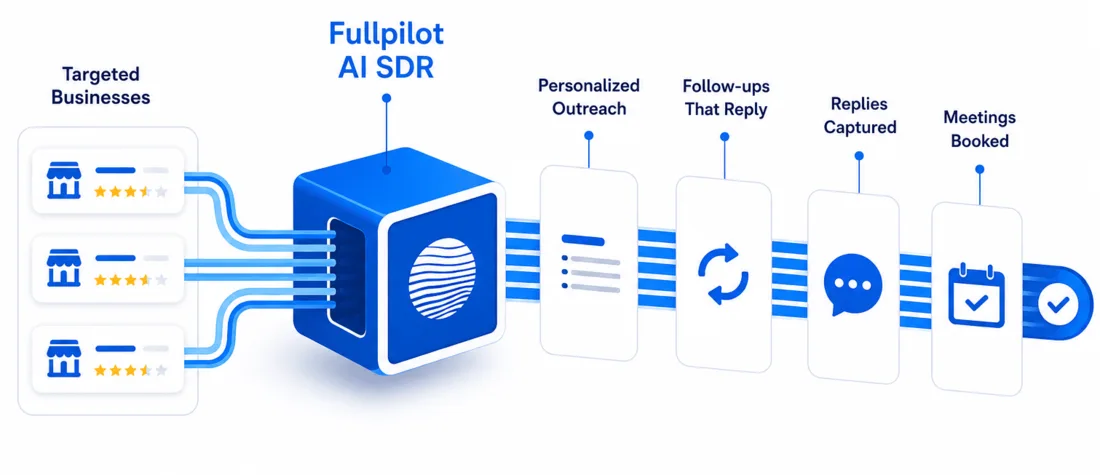
Many teams do not want to build the waterfall at all. Fullpilot is designed for that buyer: the Local Database finds the audience, our team helps prepare the campaign, and the AI SDR sends outreach, follows up, handles replies, and moves interested prospects toward a meeting.
That is why the database is a Fullpilot product, not the limit of the Fullpilot service.
Custom workflow
Clay
Best when a technical team wants full control over enrichment, logic, personalization, and routing.
- Connect many data sources
- Build custom workflows
- Prepare personalized campaigns
- Send through external tools
Local execution
Fullpilot
Best when a team wants to find local businesses, enrich contacts, and let AI SDR execution run the campaign.
- Search local businesses
- Unlock owner contacts
- Launch AI SDR campaigns
- Handle replies and handoffs
If you do not want to stitch together APIs and sending tools, you can use Fullpilot as the outbound ecosystem: search, enrich, and execute from one platform. The AI SDR can craft personalized outreach from local signals, follow up automatically, handle replies, and move interested prospects toward a booked meeting.
When should you use both Fullpilot and Clay?
Use both when you want Fullpilot’s local business data and owner contact paths, but you also want Clay’s flexibility for custom research, scoring, routing, or personalization. For example, a technical agency might use Fullpilot to find med spas with weak reviews and active websites, push those records into Clay, then use Clay to run deeper research and prepare campaign-specific personalization.
That is the partner story. Clay gives you control over the custom workflow. Fullpilot gives you the local market data, owner contacts, and optional AI SDR execution.
Should you use Fullpilot or Clay?
The answer depends on whether you want to build the outbound system or run the outbound system.
Scenario A: Use Fullpilot for speed to market
This is best for a lean agency owner, solo founder, local service provider, or sales leader who wants results without managing a complicated stack.
Use Fullpilot to find local signals, unlock owner contact data, and launch the native AI SDR. Let the AI handle personalization, follow-ups, replies, and meeting handoff.
Scenario B: Use Fullpilot and Clay together
This is best for a technical operator or growth team that wants control over every variable in the outbound motion.
Use Fullpilot as the local data source. Pull local signals into Clay tables. Run custom research and personalization in Clay. Enrich owner contacts through Fullpilot. Push the final list to the sending tool of your choice.
Which Stack Should You Choose?
| Team Type | Recommended Stack | Why |
|---|---|---|
| Lean team | Fullpilot | Faster setup, fewer tools, native AI SDR execution, and a simpler path to meetings |
| Technical growth team | Fullpilot plus Clay | Fullpilot provides local data while Clay controls custom research and personalization |
| Enterprise growth team | Fullpilot plus Clay plus existing outbound stack | Maximum control with specialized local business data feeding the system |
Bottom line: build the stack that matches your market
Clay is a powerful product. If you have the technical skill to use it well, it can change how your outbound team operates. But Clay is only as good as the data you feed it.
If your ideal customer lives on Main Street rather than inside an enterprise org chart, feeding generic B2B data into a Clay workflow can create bad-fit accounts and wasted work.
You need local signals. You need owner and operator contact data. You need to know if a business has a broken website, weak reviews, strong category fit, or a local profile that gives you a real reason to reach out.
Whether you use Fullpilot as the fuel for your Clay engine, or use Fullpilot as the all-in-one system to run campaigns from start to finish, the reality is simple: if you sell to local businesses, you need local data.
Bottom line
Find local businesses. Reach owners. Book meetings. Build the stack that matches your market.
Fullpilot
Win the Local Business Market
Find every business, reach every owner, and launch the outbound engine built for local.
Start for free